iOS 27 For Business: New Features To Watch Out For
Most iOS updates install themselves before anyone in the business notices. iOS 27 matters more, because three of its changes




Last updated: 04/06/2026
Should you give your team company phones, or let them use their own? It is one of the most common questions UK businesses ask us, and the honest answer is that it depends on your size, your sector and how much sensitive data your staff handle.
This guide breaks down both models fairly: where Bring Your Own Device (BYOD) genuinely wins, where company-owned devices are the safer choice, and the middle-ground options most people never hear about. We have kept it UK-specific, covering the tax position, GDPR and the device management tools that make either model work in practice.
“BYOD” is often used as a catch-all, but there are several distinct models, and each carries a different balance of cost, control and privacy. Here are all forms of BYOD:
Employees use their own phones for work. The business may ask them to install a security profile, but the device, the contract and the upkeep belong to the employee.
The company buys the device, owns the contract and locks it down for work use only. IT configures and manages it fully. This is the most secure model and the most restrictive.
The company owns and manages the device, but employees are allowed reasonable personal use. This is the popular middle ground: business-grade control with the convenience of a single phone.
Employees pick from a list of company-approved handsets. The business still owns and manages the device, but staff get a model they are comfortable with.
A personal device with a secure, sectioned-off work container, keeping business data separate from personal apps and photos.
For most growing businesses the real decision sits between full BYOD, COPE and COBO, so those are the three we compare directly below.
Do your team often work from home? Learn how to boost production now, read our post on the best team work apps for management and staying connected.

| Factor | BYOD | COPE (managed, personal use allowed) | Corporate-owned (COBO) |
|---|---|---|---|
| Upfront hardware cost | Lowest (none) | Higher (company buys devices) | Highest (company buys devices) |
| Ongoing cost | Often a monthly stipend | Company contract, usually discounted | Company contract, usually discounted |
| Security and control | Limited | Strong | Strongest |
| IT workload | High and unpredictable | Moderate | Moderate, but standardised |
| Employee privacy | Best for the employee | Reasonable | Most restrictive |
| Data ownership when staff leave | Difficult to recover | Remote wipe of work data | Full remote wipe |
| Handset consistency | None (every device differs) | Controlled | Fully standardised |
| Best suited to | Very small teams, low data sensitivity | Most SMEs | Regulated or data-sensitive sectors |
BYOD can have many advantages. For example, your business will save money on equipment and line rental. You could even find that employees answer client calls and messages outside working hours. Here are the 4 main advantages:
When employees are allowed to use their own devices, productivity increases. When given a device they are more comfortable and familiar with means they are able to seamlessly complete tasks. No more time wasted getting familiar with a brand-new device!
With the cloud, all data can be accessed from anywhere! Meaning your employees can work from any location as everything they will ever need is in one place! Since the pandemic remote working has become increasingly popular, making the cloud a business lifesaver.
Employees tend to keep their personal phones current, which can mean fewer out-of-date devices than an under-resourced IT team might manage.
With BYOD you are spending less money on devices that can be used elsewhere in the business, since there is no hardware to buy. For a small team on a tight budget, that saved capital can go elsewhere in the business.
It also means your employees are responsible for their devices so any damage caused will be covered by them.
People already know their own phone, so there is no learning curve and no second device to carry. Many find it genuinely more comfortable.

If you decide that you don’t want to provide your employees with equipment then you should be aware of the number of disadvantages. Though you may be saving money, this could lead to long-term problems and breaches that could cost you more in the long run.
When the company does not own the hardware, enforcing policies, applying patches and responding to incidents all become harder. Inconsistent device setups widen the attack surface.
Naturally, employees aren’t as careful with security as a company is. When using their own device they are unlikely to maintain protocol to the same level, increasing the chances of a data leak.
IT must expand security to include BYOD. New policies need to be continually created, implemented, and deployed to keep up with all the changes.
As data will be accessible from a number of personal devices this makes it increasingly vulnerable. BYOD increases the chances of data being lost or even hacked. It also provides even more difficulties when an employee is leaving the company.
Customer contacts, work files and access can walk out of the door on a device you do not control, and a departing employee may keep fielding client calls that should now go to their replacement.
A number of devices, some of which are completely different, can put a lot of strain on the IT team. With each device comes different requirements, issues, and steps that need to be taken. Especially if your IT team is small this may become increasingly difficult to manage and support them all.
With BOYD there is a lack of privacy for the employee’s personal information on the device. As IT needs to amp up its security, this can lead to a loss of privacy.
BYOD is problematic from a legal standpoint regarding sensitive information. When stored on a personal device, sensitive data has a higher chance of unauthorized access. When people are using their devices for personal use they may accidentally download a virus that could be detrimental.
An additional legal risk relates to hourly employees and the potential for overtime pay when they are expected to access data and applications outside of their scheduled work times.
This is the big one for UK businesses. Under the UK GDPR and the Data Protection Act 2018, your business remains the data controller even when personal data sits on an employee’s own phone. If that device is lost, stolen or sold without a proper wipe, the liability is yours, not the employee’s.
The Information Commissioner’s Office expects you to have a clear BYOD policy and appropriate technical controls in place.
Company-owned devices, whether fully locked down (COBO) or personal-use-enabled (COPE), solve most of the problems above.

The business owns the device, so it can enforce encryption, push updates, restrict risky apps and remotely wipe a lost or stolen phone in minutes. Because every device runs the same managed configuration, a weak point on one handset does not become a gap across the whole fleet, and IT can spot and fix problems before they spread.
Managed corporate devices make it far easier to demonstrate the controls regulators expect, and to wipe work data the moment someone leaves.
With everything logged and configured centrally, you can show the Information Commissioner’s Office exactly what protections are in place, which is far harder to evidence when company data is scattered across personal phones you do not control.
A standardised set of handsets is quicker to support, easier to patch and simpler to budget for. Your IT team learns the quirks of two or three approved models once rather than troubleshooting a different device for every employee, and updates can be rolled out across the fleet in one go.
A dedicated work phone lets staff switch off at the end of the day, which matters for wellbeing and for sidestepping the thorny question of overtime when employees are expected to be reachable on their own device.
Buying as a business unlocks discounts and tailored plans that individuals cannot get on their own. You can build a plan in about 30 seconds to see indicative costs.
In fairness, company devices are not free of drawbacks:
For most businesses these are manageable, and a managed plan spreads the cost predictably.
Whichever model you choose, the tool that actually makes it work is Mobile Device Management (MDM), sometimes called Enterprise Mobility Management. MDM lets you provision devices, enforce security policies, whitelist apps and remotely wipe data, all from one dashboard.
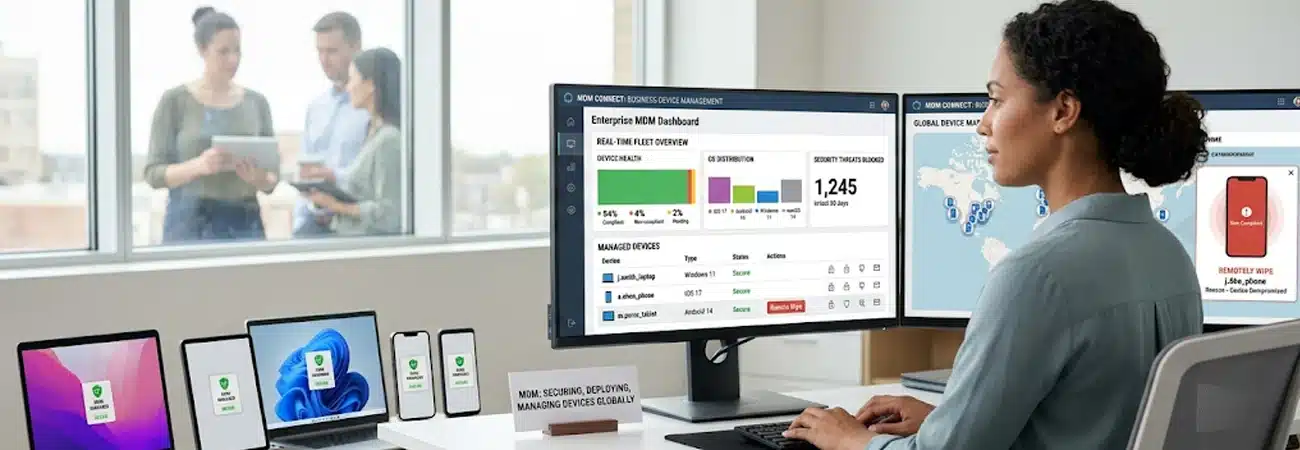
The major platforms are built in: Apple Business Manager and Apple Business Essentials for iPhones, Android Enterprise and Samsung Knox for Android, with Microsoft Intune widely used across both. On a corporate device this is straightforward. On a personal BYOD phone you can usually only manage the work container, and only with the employee’s consent.
If you are weighing this up across a larger fleet, our guide to SIM fleet management for business covers how eSIM and remote provisioning change the picture.
For UK businesses there is a useful tax point in favour of company phones. HMRC generally treats one mobile phone provided to an employee as exempt from a taxable benefit-in-kind, provided the contract is in the company’s name. That exemption is limited to a single phone per employee.
By contrast, simply paying a cash allowance towards an employee’s personal contract is usually treated as taxable earnings. The mechanics matter, so confirm your specific situation with your accountant, but the headline is that a company-owned phone is often the more tax-efficient route.
If full company ownership feels like too much, a stipend model sits between the two. The employee uses their own phone and the business pays a fixed monthly contribution towards the cost. It keeps hardware spend down while sharing the bill fairly.
The catch is that a stipend does nothing for security or GDPR exposure on its own, and as noted above it can carry a tax cost. Many businesses that start here eventually move to COPE once the team grows.
Small businesses (2 to 10 staff). BYOD or a stipend can work if data sensitivity is low and budgets are tight. As soon as you handle meaningful customer data, lean towards managed devices. See our small business mobile plans.
Medium businesses (10 to 50 staff). This is COPE territory: enough scale that inconsistent personal devices become a real support and compliance burden, but with staff who still value some personal use. Explore medium business plans.
Corporate (50+ staff). Standardised, fully managed devices almost always win on security, support and predictable cost. Our corporate mobile solutions are built for managing a mobile estate at scale.
The risk is not hypothetical. The ICO regularly penalises organisations for losing unencrypted devices that hold personal data, and a lost or stolen laptop, phone or USB stick is one of the most common triggers for enforcement. Both the ICO’s own BYOD guidance and the NCSC’s guidance stress the same point: you need a clear policy, ongoing monitoring, and encryption on any device holding personal data.
Take North East Lincolnshire Council, fined £80,000 after an unencrypted memory stick holding the records of 286 children went missing and was never recovered. The council had an encryption policy but had delayed introducing it and then failed to ensure staff followed it, which is precisely the BYOD failure mode: a policy that exists on paper but is not enforced on the devices that matter. With managed company devices, encryption and remote wipe are applied centrally, so a lost handset is an inconvenience rather than a reportable breach.
Though it may initially seems the advantages of BYOD and its perks are clear, it comes with a HUGE number of safety concerns that could lead to extortionate fines and detrimental problems. BYOD is a reasonable starting point for very small teams with low data sensitivity, and it keeps upfront costs down.
But as soon as you grow, handle customer data or care about GDPR compliance, company-owned phones, usually in a COPE setup, give you the control, security and tax efficiency that BYOD cannot match. The right answer is rarely “always one or the other”; it is matching the model to your size and your risk.
If you want to stay stress-free then why limit yourself? Shop our business mobile deals today and never worry about hidden fees again! Missed some payments? Here’s how to get a Business Phone Contract on Bad Credit!
Break away from outdated communication channels and streamline your workforce – upgrade to a Business VoIP phone system today.


iOS 27 For Business: New Features To Watch Out For
Most iOS updates install themselves before anyone in the business notices. iOS 27 matters more, because three of its changes touch decisions you actually have

What happens if you cancel a business mobile contract early?
Quick Answer: Cancelling a business mobile contract early will usually mean paying the remaining months of your agreement in full, including any outstanding device balance.

SIM Fleet Management for Business: What IT Managers Need to Know
Quick Answer: For IT managers, eSIM turns fleet management from a physical logistics exercise into a digital one. It enables zero-touch provisioning, remote line activation and deactivation, dual SIM

O2 EU Roaming for Business: What’s Included in 2026?
Quick Answer: O2 is the only major UK network to include EU data roaming at no extra cost on business contracts. Under its “Roam Like at Home”