iPhone 18 Pro / Pro Max just landed. Limited stock. Order yours from £46/month >
iPhone 18 pre-order









You may have a SIM card but have no clue as to what it actually does. We know that our mobiles need this tiny little card to allow us to make calls and send texts, however, have you ever really questioned what one is, or wondered how does a SIM card work? We’re here to break it down for you, including modern eSIMs, 5G compatibility, and how to activate a SIM card in 2025.
The concept of a SIM card may seem quite complicated and difficult to wrap your head around, however, it is integral for your mobile.
The acronym SIM stands for Subscriber Identity Module. It stores important data, such as your unique phone number. The card (or its digital equivalent, an eSIM) contains an International Mobile Subscriber Identity (IMSI) and authentication keys to securely connect you to your network provider. It also stores contacts and some text messages, making it essential for mobile functionality.
The card itself is a small piece of removable plastic that can be inserted into your mobile. Alternatively, an eSIM is a digital version embedded in modern devices, activated via software.
Your phone provider (or Businessmobiles.com) will provide you with a SIM card that can be used in any mobile device providing it is the correct size. For eSIMs, providers send a QR code or digital profile for activation. Through your SIM card, you can access the same network, number, and messages.
FUN FACT: The first SIM card was invented in 1991 and was the size of a credit card! By 2018, eSIMs began transforming mobile connectivity, with over 50% of new devices in 2025 supporting them.
This little piece of plastic allows you to connect to your network provider. You can make calls and send messages, and even connect to mobile internet services. Without one of these cards, a phone can not make calls or access any of your data.
It authenticates your device to the network, enabling voice calls, texts (SMS), and data access (4G/5G). It also supports advanced features like VoLTE (Voice over LTE) and stores limited data, including up to 250 contacts.
When you place your card into any new phone it will retain all your contacts, phone number, and messages. So you don’t have to worry about losing touch! For eSIMs, this data is transferred digitally when you activate a new profile.
In short, these cards are what differentiates your mobile from an MP3 player. Without it, a mobile isn’t really a mobile. Not sure if you have one? Well, if you are able to make phone calls, send messages, and access mobile internet, then you have a SIM card! If your device is lacking a SIM tray, it most likely uses eSIM instead.
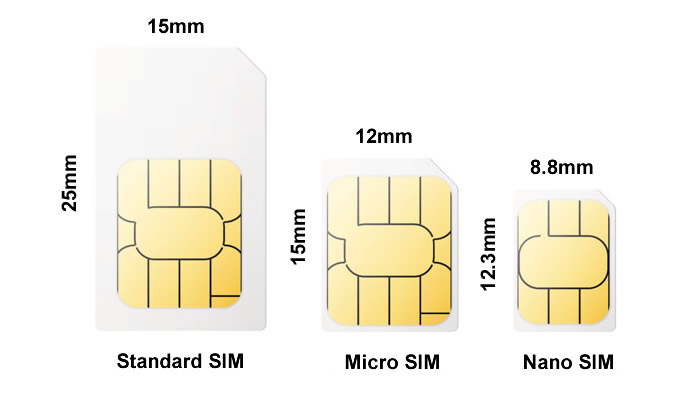
If you have ever seen a SIM card then you know they are very small and very easy to misplace. Over the years these cards have changed a lot in size. As our mobiles got bigger the card got smaller to make room for all the exciting upgrades. Those extra cameras had to go somewhere!
SIM cards come in four types: a Standard, a Micro-SIM, a Nano-SIM, and an eSIM:
| Type | Size (mm) | Introduced | Common Devices |
| Standard SIM | 25 x 12 | 1991 | Older phones (pre-2010) |
| Micro-SIM | 15 x 12 | 2010 | iPhone 4, early Androids |
| Nano-SIM | 12.3 x 8.8 | 2012 | Most modern phones (EG: iPhone 16, Galaxy S25) |
| eSIM | Embedded (digital) | 2018 | iPhone 16, Pixel 9, high-end tablets |
The size of the card you need depends on the mobile phone you choose. When ordering a new mobile package you will be provided with the suitable SIM size, so you do not need to panic. However if you are buying a SIM only plan then you need to ensure that you are ordering the correct size for your desired mobile.
A quick Google search will reveal what size you will need. For eSIM-compatible devices, check your phone’s settings or provider’s website to confirm support. Here’s how to set up an eSIM on iPhone.
Even though these cards can vary in size, they all contain the same amount of information and do the same job!
An eSIM (embedded SIM) is a digital version of a traditional SIM card, built directly into your device’s hardware. Unlike physical SIMs, eSIMs are non-removable and activated via software, typically by scanning a QR code or downloading a profile from your provider. Introduced in 2018, eSIMs are now standard in over 50% of new devices in 2025, including the iPhone 17, Samsung Galaxy S25, and Google Pixel 9.
eSIMs are ideal for tech-savvy users and businesses managing multiple lines, but ensure your provider supports eSIM activation.

Choosing between an eSIM and a physical SIM depends on your device, needs, and provider support. Here’s a comparison to help you decide:
| Feature | eSIM | Physical SIM |
| Form | Digital, embedded in device | Plastic card (Standard, Micro, Nano) |
| Activation | QR code or app-based | Insert into tray, manual setup |
| Flexibility | Switch carriers via software | Requires new card for new carrier |
| Device Support | New devices | Most devices, including older models |
| Storage | Multiple profiles possible | One card per plan |
| Travel | Easier to add international plans | Swap SIMs for roaming plans |
| Eco Impact | No plastic waste | Plastic card production |
| Risk | Harder to lose; digital errors possible | Easy to misplace; physical damage risk |
Both options support 4G/5G and VoLTE, but eSIMs are the future, with the vast majority of UK carriers offering eSIM plans in 2025. Industry analysts predict that 70% of all cellular devices will be shipped with eSIM by 2030.

Now you know what is a SIM card you may be wondering how do you get the card into your mobile? The instructions on how to insert one should be found in your new mobiles’ manual, but it is normally quite easy to locate.
Modern devices may use eSIMs only, with no physical tray. Check your device specs to confirm. For dual-SIM phones, the tray may support two Nano-SIMs or a SIM + eSIM combo. For non-smartphone devices (EG: tablets, feature phones), consult the manual or provider’s website. Here’s how to access the SIM tray on your iPhone or Samsung phone:

iPhone users You will see a tray on the right hand side of your phone that needs to be opened with the SIM ejector tool (included in the box). Or if you can not locate this a simple paperclip will suffice. Push it in gently and the tray will pop out for you to insert or remove your sim card.

You will need to perform the same steps as above. If you are having trouble locating the tray make sure that if you have a removable back cover that this is removed. However, if you are still struggling to locate the SIM tray then you can always rely on Google to provide you with the answers.
Now you know how to insert and remove your SIM cards with ease, it’s time to activate. Activating a SIM card ensures it connects to your provider’s network. The process varies by provider and whether you’re using a physical SIM or eSIM. Here’s how to activate a SIM card in 2025:
Troubleshooting: If activation fails, check your account status (no arrears), ensure the SIM is compatible with 5G/4G, or contact your provider.
If you’re trying to save money for your business but need to get your hands on some brand-new mobile plans, then look no further! We have a range of offers to suit any budget, including 5G-ready SIMs and eSIM-compatible plans. From luxury handsets to affordable SIM cards, all at a cheaper rate than going directly to the network.
Browse some of the best Business SIM only deals & plans in the UK now, or shop our business eSIM deals here.
Looking for an alternative to traditional telephones and mobile contracts? Shop deals on Cloud Business VoIP phone systems and enjoy some big benefits.